
Experience the Latest
SMF Device Lock App
The SMF device lock app you already know and use, now with an easier interface and improved tools to help you enroll devices, manage customers, and run your device financing business more smoothly. Simply update your existing SMF app to access the new experience. If you are new to SMF, you can register and get started directly through the app.


What the Updated SMF App Offers
Easier Login & Quick Start
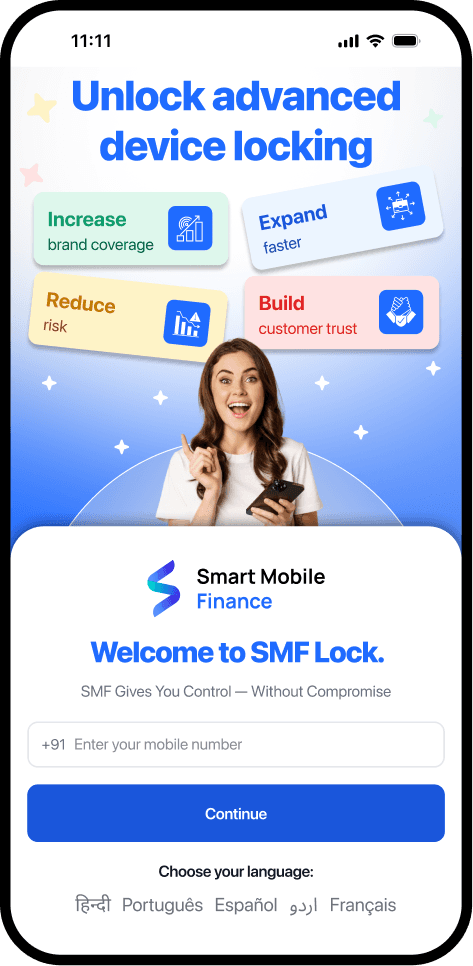
Log in securely with your mobile number and OTP, add licences, and get started right away.
User-Friendly Interface
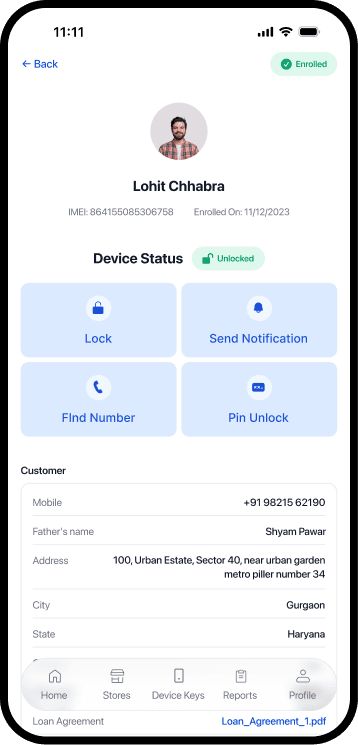
All information and actions are clearly organized under simple tabs. Access customers, licences, reports, and key device actions in just one click through the updated interface.
Guided User Flow
Quick access to key actions like device enrollment, lock, unlock, and Find Number directly from the home screen.
Easier Licence Management
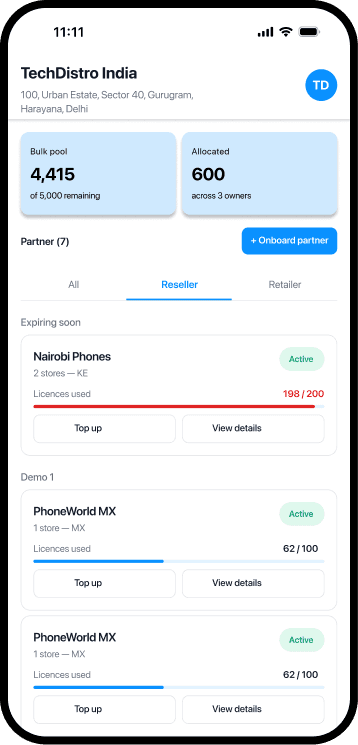
Choose an available package, check your remaining licences, and purchase more device keys when required.
Manage Multiple Stores and Users
Add stores, create users, and decide what each user is allowed to access.
Improved Reports
View enrollment, lock/unlock, and device-release activity. Use filters to find the required customer or device information more easily.
The device enrollment method and essential device lock capabilities remain the same. The updated app interface simply makes them easier to access and manage.
Download NowHow to Get Started
Already Using the SMF Device Lock App?
- Update your existing SMF app from the Google Play Store.
- Log in using your registered mobile number and OTP.
- Continue managing your customers and financed devices through the updated app.
New to SMF Device Lock App?
- Download the SMF Finance Locker app.
- Verify your mobile number and enter your business details.
- Select your business type.
- Choose an available licence package.
- Complete KYC and begin enrolling devices.
Available for all Android devices. Features, packages, payment options, and languages may vary by country.